
How to
Install
Head North installs from the Play Store on the bike screen. There is nothing to set up on your own phone and nothing to sign up for.
What you need
- Your Stark VARG, switched on, with the Arkenstone screen working.
- Wi-Fi or mobile data on the bike screen. You need it to install the app and to load the map for an area the first time.
- A GPX file for the ride you want to follow. This is a small file that holds the shape of a trail. Almost every route planner can export one.
Install the app
- On the bike screen, open the Play Store.
- Search for Head North.
- Tap Install, then open the app.
There is no account to create and no email to enter. Head North is a single purchase, not a subscription.
Allow location
The first time you open the app it asks to use your location. Without it the map cannot show where you are.
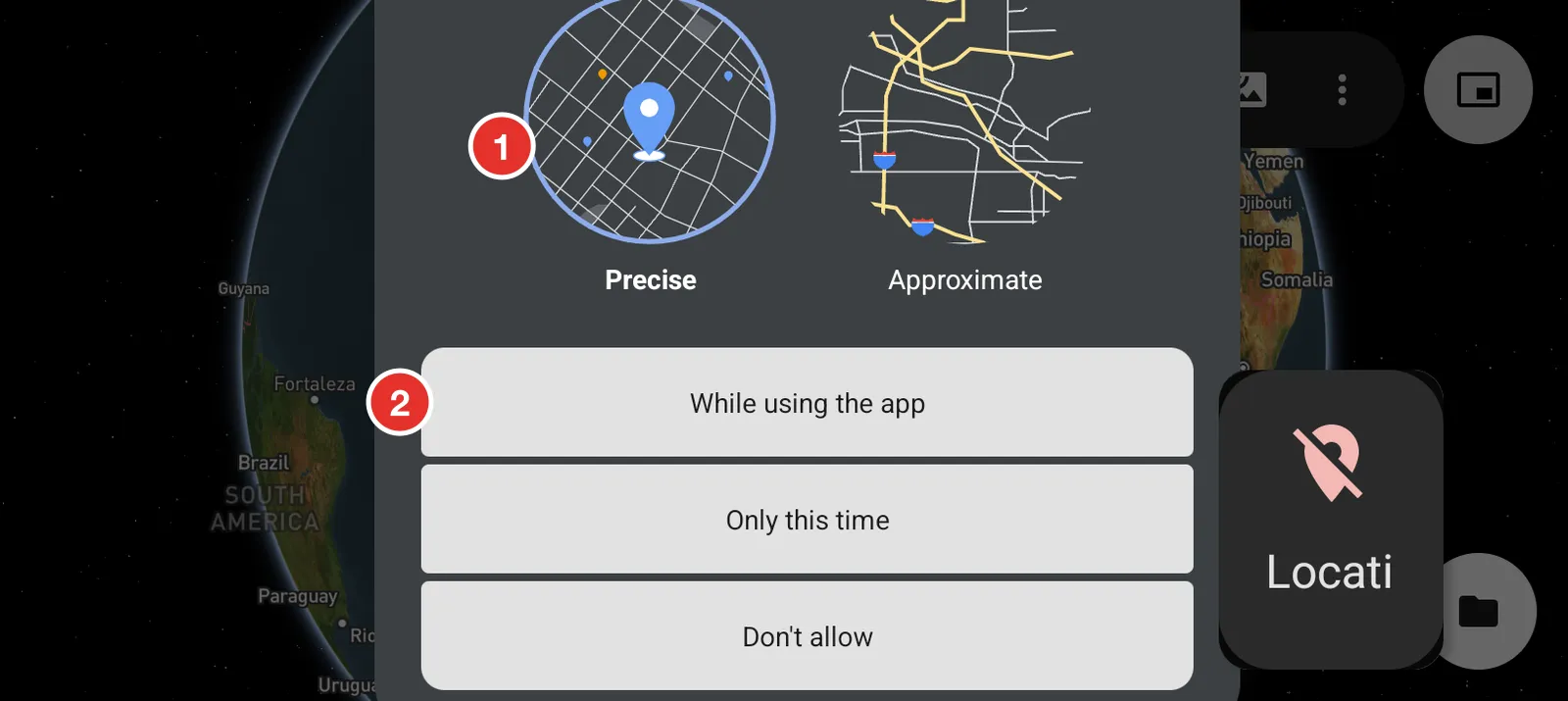
- Choose Precise. Approximate is accurate to about a kilometre, which is no use on a trail.
- Tap While using the app.
The panel is taller than the bike screen, so drag it up if you cannot see the buttons.
Before you leave home
The map keeps the areas you have already looked at. Open your route on the bike screen while you still have signal and pan along it once. The map is then ready when the signal drops on the trail.