
Best navigation apps for Stark VARG riders
What VARG owners actually use, what works on the Stark phone, and how to pair the right apps together for trail riding.
Navigation on the Stark VARG is a bit different
The Stark VARG has an Android phone built into the handlebars (Stark calls it the Arkenstone). That means you can install apps from the Play Store just like on a regular phone. Sounds great in theory.
In practice, there are two things you need to know:
- The Stark app takes over the screen while riding. Every time you put the bike in Drive, the gauge display pushes to the front. Your map app gets sent to the background. There are workarounds for this, but it’s something to plan for.
- Off-road riding needs a different kind of navigation. Turn-by-turn voice prompts are useless on single track. You can’t “turn left at the next intersection” when there’s no intersection — just a faint trail through the trees. What works is a visual map with your planned route drawn on it, so you can see where you are and which way to go at a glance.
With that in mind, here are the apps riders actually use — and an honest take on each.
onX Offroad
This is the most popular choice among VARG riders, and for good reason. onX has the best trail database out there for off-road riding in North America.
What riders like
- Incredible trail database. Every trail is marked with type (single track, 50-inch, high clearance, etc.), difficulty rating, length, and user reviews. You can see at a glance which trails are legal and which are closed.
- Land ownership layers. See who owns the land you’re riding on — public, private, BLM, Forest Service. Massive for riding in the western US.
- Offline maps. Download entire regions for use without cell service.
- Route planning on desktop. Plan your ride on a computer, and it syncs to the app automatically.
- Ride recording. Track your ride for later review.
What to watch out for
- Subscription required. Around $30/year for the off-road tier.
- Full-screen app. To see your map while riding on the Stark phone, you need to use split screen or another workaround. onX doesn’t have a floating window mode.
- North America focused. The trail database is strongest in the US and Canada. Coverage in Europe and other regions is thinner.
GAIA GPS
GAIA is the other heavyweight. It’s popular with backcountry hikers, overlanders, and dual-sport riders. Think of it as the power-user alternative to onX.
What riders like
- Massive map layer library. Topo maps, satellite, USFS, MVUM, and dozens more. You can stack layers for exactly the view you need.
- Strong GPX handling. Import, export, edit, and share GPX files easily. Very flexible for riders who plan routes in multiple tools.
- Good offline support. Download areas for offline use, including multiple map layers.
- Global coverage. Better international map coverage than onX for riders outside North America.
What to watch out for
- Subscription model. Free tier is limited. Premium is around $40/year.
- Steeper learning curve. More features means more buttons. Takes a bit longer to figure out than onX.
- Same screen problem on the Stark. Full-screen app that needs a workaround to stay visible while riding.
Locus Maps
Locus is less well-known in the US but has a strong following in Europe. It’s particularly good for riders who want granular control over map sources and GPX rendering.
What riders like
- Extremely flexible. Support for custom map sources, online and offline maps, detailed GPX rendering with elevation profiles.
- Freemium model. The free version is very usable. Premium adds more features but isn’t required.
- Strong in Europe. Good map coverage and community outside North America.
What to watch out for
- Interface isn’t the prettiest. It’s functional but not as polished as onX or GAIA.
- Smaller community. Fewer shared routes and less trail-specific data compared to onX.
Google Maps
We all have it. We all know it. But should you use it on your VARG?
The appeal
- Free. Already installed. Familiar.
- Great for getting to the trailhead on public roads.
Why it falls short off-road
- No GPX support. You can’t load a trail file. Google Maps doesn’t know what a GPX is.
- No trail data. It shows roads. Off-road trails either don’t exist on the map or show up as faint unnamed lines.
- Turn-by-turn is distracting. Voice prompts telling you to “continue straight” every 30 seconds while you’re on single track is maddening.
- Satellite view is helpful, but... You can see the terrain from above, which is nice, but without a trail line drawn on the map you’re just guessing.
Verdict: Use Google Maps to get to the ride. Use something else once you’re on the trail. For a step-by-step walkthrough of getting it running on your dashboard, see our Google Maps on the Stark VARG dashboard guide.
Stark Trails (built-in)
The official option from Stark, built into the EX app.
What it does well
- No extra app to install. It’s part of the Stark interface.
- GPX upload and basic map view powered by Mapbox.
- Ride recording synced to your Stark account.
What riders say on the forum
- Maps are “simpler than Google Maps” and “not as robust as onX.”
- Requires the Pro subscription (€12.90/month) after the 3-month trial.
- Bundled with Advanced Power Mode, so if you pay for power tuning, navigation comes with it.
For a deeper dive, check our Head North vs Stark Trails comparison.
Head North
Full disclosure: this is our app. But here’s why it exists and what it’s actually for.
Head North isn’t trying to replace onX or GAIA. It does one specific thing: keeps a GPS map visible on your Stark dashboard using a floating window.
What it does
- Floating map that stays on top of the Stark gauge display.
- Shows your position, heading, and GPX trail in real time.
- Multi-route GPX and waypoints.
- Street, terrain, and satellite map views.
- Tap to expand full screen, tap to shrink back.
What it doesn’t do
- No trail database or community routes.
- No route planning.
- No ride recording.
- No turn-by-turn.
How riders use it
Plan your ride in onX, GAIA, or Komoot. Export the GPX. Load it in Head North. Ride with the trail visible on your dashboard the whole time. That’s the workflow.
One-time purchase. No subscription, no account.
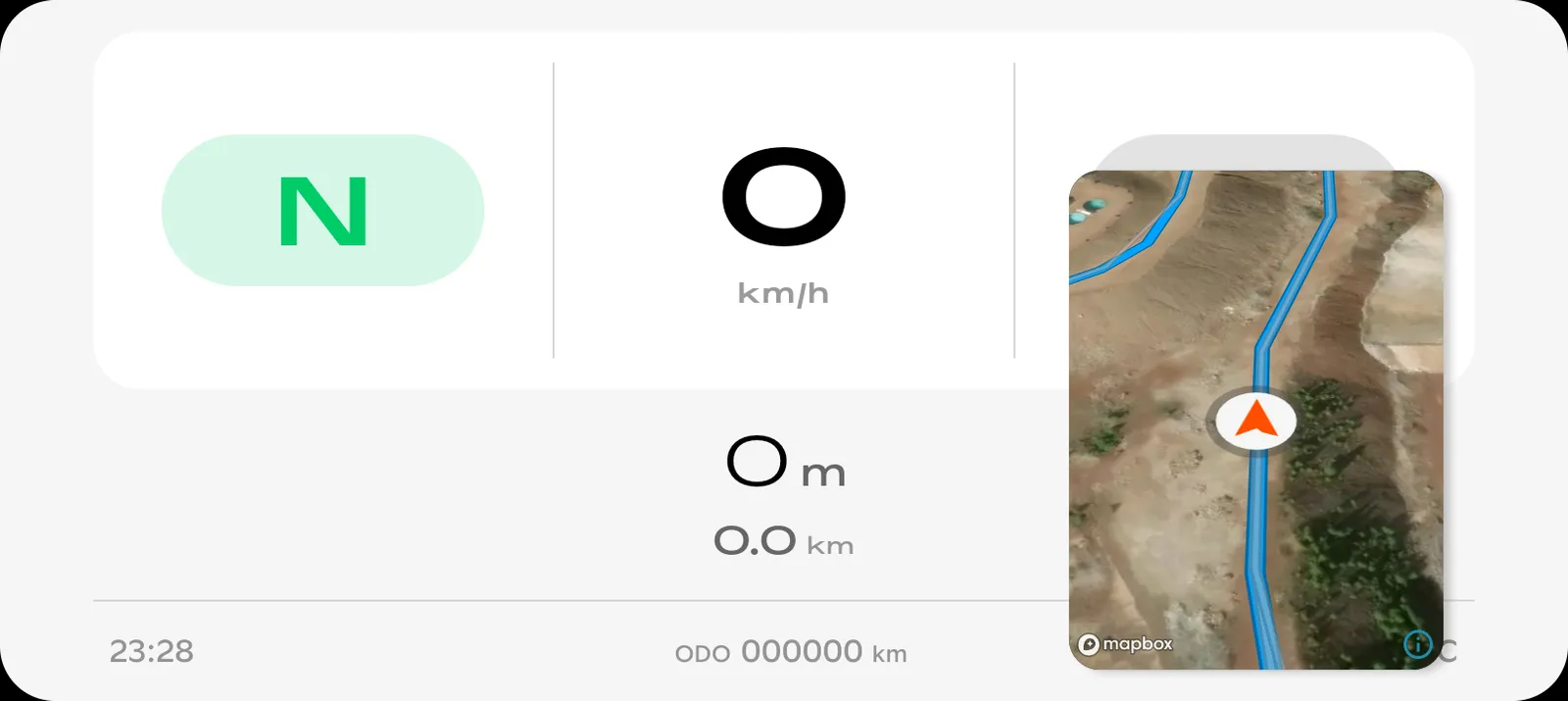 Head North floats on top of the Stark dashboard.
Our recommendation
No single app does everything. Here’s what we’d suggest:
- For planning rides: Use onX Offroad (North America) or GAIA GPS (especially for international riders). These are the best at finding trails, checking land ownership, and building routes.
- For riding: Export your GPX and load it in Head North. The floating map keeps your trail visible while the Stark dashboard does its thing underneath.
- For getting to the ride: Google Maps to the trailhead. It’s free and it knows every road.
These apps complement each other. You don’t have to pick just one.

Get Head North
GPS navigation that stays visible on your Stark VARG dashboard the whole ride. One-time purchase, no subscription.
Last updated on